Posts

Showing posts with the label Data Scientist Toolkit

Building Production-Ready Blockchain-Enabled Agents: Zero to Hero - Part 2

Image
In our previous article , we established a foundational architecture for blockchain-enabled agents using LLMs. Now, we'll focus on optimizing two critical components - LLM Integration and Context Management - to create a more robust, production-ready system. Zero to Hero Enhanced LLM Integration with Langchain Our initial implementation used a basic LLamaModel setup. While functional, production environments demand more sophisticated capabilities. Let's enhance our implementation using Langchain with the Qwen2.5-7B-Instruct model: class OptimizedBlockchainLLM:     def __init__(self, model_config, web3_provider, context_manager):         # Initialize Qwen model through Langchain         self.llm = Qwen(             model_name="Qwen/Qwen2.5-7B-Instruct",             temperature=0.7,             max_tokens=2048,           ...

Retrieval Augmented Generation (RAG) and Blockchain-Enabled Agents

Image
In our previous article , we discussed how autonomous agents can interact with blockchain networks to execute transactions, monitor events, and make decisions based on predefined rules. These agents represent a significant step forward in automating blockchain interactions, but they face a crucial challenge: the ability to understand and process complex blockchain data in a more human-like way. This is where Retrieval Augmented Generation (RAG) comes into play. RAG represents the next evolution in autonomous agent capabilities, enabling them to not just interact with blockchain data, but to understand it in context and provide meaningful insights through natural language processing. By combining the decision-making capabilities of blockchain-enabled autonomous agents with the intelligence of Large Language Models (LLMs) and the precision of RAG, we can create more sophisticated systems that bridge the gap between blockchain technology and human understanding. Understanding RAG: The Pow...

Memory Buffer as Vector Database in Autonomous Agents

Image
In the rapidly evolving landscape of Large Language Models (LLMs) and autonomous agents, one of the most crucial yet often overlooked components is the memory system. Traditional databases have served us well for decades, but the unique requirements of LLM-based systems demand a fresh perspective on data storage and retrieval.  Today, we'll dive deep into why vector databases are becoming the backbone of modern AI memory systems, with a particular focus on their role in Blockchain-Enabled Autonomous Agents architecture . The Limitations of Traditional Databases for LLM Applications Traditional SQL and NoSQL databases were designed for structured data and exact matches. When you query a SQL database, you're typically looking for precise values: "Find all transactions from user_id 12345" or "Get all products in category 'electronics'." While these databases excel at these tasks, they fall short when dealing with the fuzzy, contextual nature of AI inter...

NLP for Data Scientists - SpaCy

Image
Introduction It's been a while since we introduced new library, so today we'll talk a bit about SpaCy , which is an Natural Language Processing library for Python. Now, you'll say: Wait a minute, what about NLTK? Yes, both in Natural Language Processing with Python and Tweets analysis with Python and NLP we used NLTK, but from now on - no more. The reason couldn't be described better than in Spacy's author article about why he chose to write the library in the first place. What NLTK has is a decent tokenizer, some passable stemmers, a good implementation of the Punkt sentence boundary detector, some visualization tools, and some wrappers for other libraries. Nothing else is of any use. Installation Starting to work with SpiCy is easy, first install it and then download the model data. pip install scipy python -m spacy.en.download The rest is pretty straight forward, import the library and start using according to the documentation. Let's see ho...

Python for Data Scientists - Rodeo

Image
Introduction I love Python, I really do and that goes for IPython as well - it's a great tool and simplifies the work by a lot. But.. there is always a but, isn't it? RStudio is so much better and until recently we, the Python data enthusiasts, could only nervously look at RStudio while working on somewhat beloved, somewhat limped brother IPython. Well, no more. Let me introduce you Rodeo The IDE is free and super easy to use, it's very similar to RStudio and after you watch the introduction video above, you'll be ready to go.

Python for Data Scientists - scikit-learn

Image
Introduction In the previous posts we've covered the basics of data analysis. Now it's gloves off and here come the big guns - machine learning library called scikit-learn. scikit-learn has become one of the most popular open source machine learning libraries for Python. It provides algorithms for machine learning tasks including classification, regression, dimensionality reduction, clustering and many more. It also provides modules for extracting features, processing data and evaluating models. Installation scikit-learn is dependent upon both NumPy and SciPy, of which we've talked. So make sure to upgrade both to latest version prior to installing the package, which is done, of course, using the python package manager. pip install scikit-learn Conclusion scikit-learn covers a very broad spectrum of data science fields, each deserving a dedicated discussion. And this is exactly what we're going to do for the next couple of sessions, diving deeper into each...

Python for Data Scientists - Matplotlib

Image
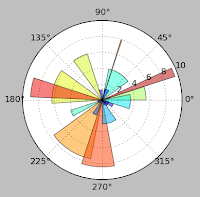
Introduction Sure, with both pandas and SciPy you can perform some superb data analysis. And with the IPython , working sure became much easier. But how about presenting your results? Today we'll talk about Matplotlib - our presentation package. Making plots and static or interactive visualizations is one of the most important tasks in data analysis. It may be a part of the exploratory process; for example, helping identify outliers, needed data transformations, or coming up with ideas for models. Installation Installation of matplotlib is easy. If don't have it preinstalled as part of your Python distribution, just do it manually using python package manager pip install matplotlib Usage Since we're already familiar with IPython, I'll be only covering it's usage as this is a preferable way of writing data analysis procedures. In console mode graphs are plotted in a separate newly created window, each time you render a plot. In web mode, it's b...

Python for Data Scientists - IPython

Image
Introduction Having learned some basic packages of Python, you probably started to wonder that working through the python console is not very productive. In R we have RStudio, of which we've already talked in first  articles . Good folks of Python community have developed an IPython - an interactive Python console and web environment. Installation As usual we are using python pip package manager to install the package: pip install ipython Usage Once the package is installed, you can launch the console version by simply typing it's name in the console: ipython Once the application is started, one can simply type python commands and observe the results. Though it doesn't look that far different from the ordinary python console, it provides auto-quoting, code completion, search of previously executed commands, output caching and many more. As I said previously, there are two modes of running the IPython - console and web. To launch the web interface, one...

Python for Data Scientists - Pandas

Image
Introduction Having learnt NumPy and SciPy in previous articles, let's discuss our next package, called pandas. Pandas provides rich data structures and functions designed to make working with structured data fast, easy, and expressive. It is, as you will see, one of the critical ingredients enabling Python to be a powerful and productive data analysis environment. Pandas combines the high performance array-computing features of NumPy with the flexible data manipulation capabilities of spreadsheets and relational databases (such as SQL), mingling DataFrame - a two-dimensional tabular, column-oriented data structure with both row and column labels. It provides sophisticated indexing functionality to make it easy to reshape, slice and dice, perform aggregations, and select subsets of data. For users of the R language for statistical computing, the DataFrame name will be familiar, as the object was named after the similar R data.frame object. However the functionality...

Python for Data Scientists - SciPy

Image
Introduction This article continues the Python for Data Scientists series by talking about SciPy . It is built on top of NumPy, of which we've already talked in the previous article . SciPy provides many user-friendly and efficient numerical routines addressing a number of different standard problem domains in scientific computing such as integration, differential and sparse linear system solvers, optimizers and root finding algorithms, Fourier Transforms, various standard continuous and discrete probability distributions and many more. Together NumPy and SciPy form a reasonably complete computational replacement for much of MATLAB along with some of its add-on toolboxes. Installation Installation of SciPy is trivial. In many cases, it will be already supplied to you with python distribution, or as usual may be installed manually using python package manager pip install scipy Depending on the running OS, you might be needing to install gfortran ...

Python for Data Scientists - NumPy

Image
Introduction We'll start our Python for Data Scientists series with NumPy , short for Numerical Python, which is the foundational package for scientific computing in Python. One of its primary purposes with regards to data analysis is as the primary container for data to be passed between algorithms. For numerical data, NumPy arrays are a much more efficient way of storing and manipulating data than the other built-in Python data structures. Also, libraries written in a lower-level language, such as C or Fortran, can operate on the data stored in a NumPy array without copying any data. Here are some of the things it provides: A fast and efficient multidimensional array object ndarray Functions for performing element-wise computations arrays Tools for reading and writing array-based data sets to disk Linear algebra operations, Fourier transform, and random number generation Tools for integrating connecting C, C++, and Fortran code to Python  Knowing Numpy is fundam...